How To Set Up An Ergonomic Work Station-A Practical Guide
How to set up an Ergonomic work station
How to set up an Ergonomic work station properly is one of the simplest ways to reduce daily aches, improve focus, and protect your body from long-term strain.
Whether you work from home or in an office, small adjustments can make a noticeable difference to comfort, energy levels, and productivity.
An ergonomic workstation isn’t about buying expensive equipment or forcing perfect posture.
It’s about setting up your workspace so your body can stay relaxed, supported, and efficient throughout the day.
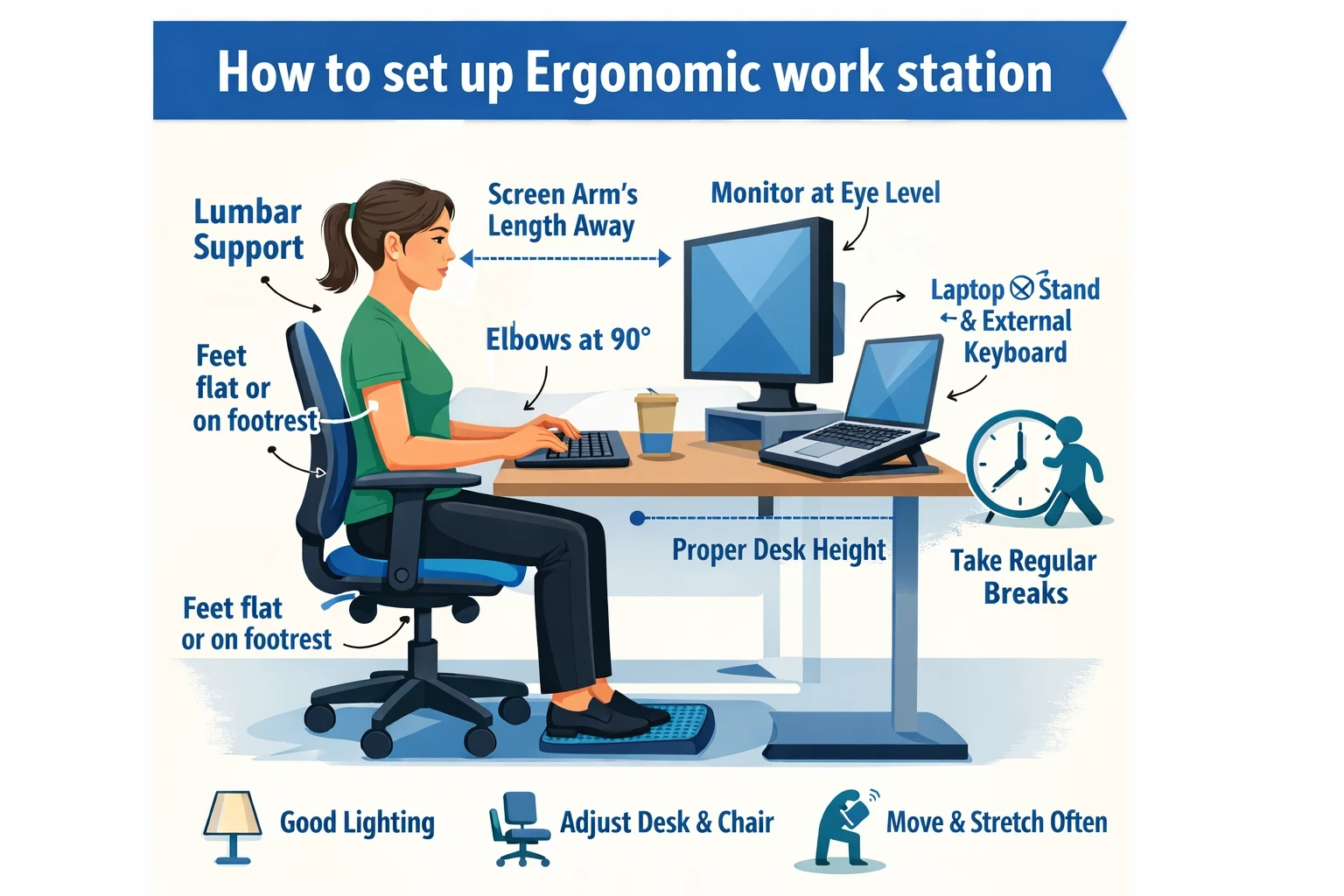
Start with your chair (your foundation)
Your chair forms the base of your entire setup.
Sit with your feet flat on the floor and your knees roughly level with, or slightly lower than, your hips.
This position supports circulation and reduces unnecessary pressure on the lower back.
If your chair includes lumbar support, adjust it so it rests gently against the natural curve of your spine.
If it doesn’t, a small cushion or rolled towel can work surprisingly well.
Armrests should allow your elbows to rest comfortably without lifting your shoulders.
If you’re choosing seating for daily work, an ergonomic chair for back pain relief may help you understand what features actually matter:
https://beyond-pain-relief.com/ergonomic-office-chairs-for-back-pain-relief/
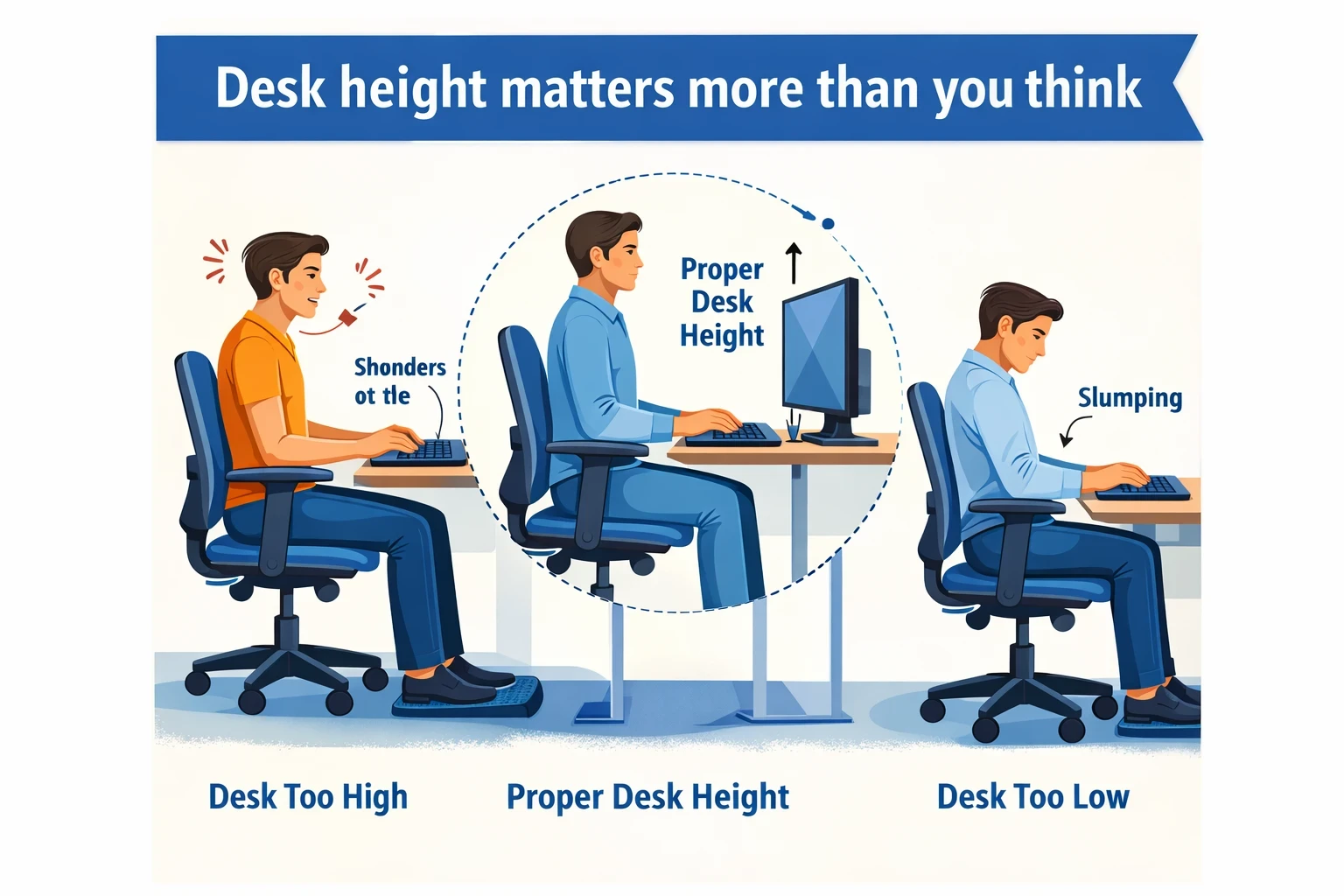
Desk height matters more than you think
One of the most common mistakes when learning how to set up an Ergonomic work station is ignoring desk height.
When seated, your forearms should rest on the desk with elbows close to your sides and bent at roughly 90 degrees.
If the desk is too high, your shoulders tend to creep upward, creating tension in the neck.
If it’s too low, you’ll likely slump forward over time.
Adjustable desks make this easier, but you can also adjust chair height and use a footrest if needed.
Position your screen to protect your neck
Your monitor should sit directly in front of you, about an arm’s length away.
The top of the screen should be at, or just slightly below, eye level.
This keeps your neck in a neutral position instead of tilting forward or backward for hours.
Laptop users often struggle here.
Using a laptop stand with an external keyboard and mouse is one of the simplest upgrades you can make when setting up an ergonomic workstation at home.
Keyboard and mouse placement
Your keyboard should sit close enough that your elbows stay near your body.
Keep your wrists straight rather than bent upward or sideways.
The mouse should be at the same height and distance as the keyboard to avoid repeated reaching.
A good rule when deciding how to set up an Ergonomic work station is this: if something makes you shrug, lean, or stretch repeatedly, it needs repositioning.

Lighting and screen glare
Poor lighting contributes to eye strain, headaches, and subtle tension through the neck and shoulders.
Place your screen so windows sit to the side rather than directly in front or behind it.
Use soft, indirect lighting where possible.
Adjust screen brightness so it matches the room instead of overpowering it.
Small changes here can significantly improve comfort over long workdays.
Movement is part of ergonomics
Even the best workstation won’t protect you if you stay still all day.
True ergonomics includes movement. !!
Stand up, stretch, or walk for a minute every 30–45 minutes.
When thinking about how to set up an Ergonomic work station, remember that stillness itself is a form of stress.
Regular movement keeps joints lubricated and muscles relaxed.
Fantastic range of office chairs at competitive prices here on Amazon.
Small habits that add up
- Keep frequently used items within easy reach
- Avoid holding the phone between your shoulder and ear
- Relax your shoulders and jaw regularly
- Reassess your setup as your workload changes
Ergonomics is not a one-time fix. It’s an ongoing process that adapts to your body and daily demands.
Final thought
Learning how to set up an Ergonomic work station is about reducing unnecessary strain rather than chasing perfection.
Comfort, neutrality, and regular movement matter far more than any single piece of equipment.
Over time, these small, practical changes can significantly reduce neck, shoulder, and back discomfort—especially for people who spend long hours seated.
Scientific Research
https://pubmed.ncbi.nlm.nih.gov/30663547/